
Menu
Getting started with Web Application
Conditions of Use

Fast Internet Connection
- Web Application works on the principle of an "Application in a Browser".
- The connection is built through CloudFlare (make sure that your ISP does not block connections to it)
- For comfortable work you will NEED FAST INTERNET (connection speed 1-2 Mbps is NOT suitable)
- To get started, you NEED to wait for the application to load in your browser
- For comfortable work with MacOS, you must use the Google Chrome browser (Safari will not copy the proxy).
- ⬇️Slow internet? - download the apps: ⬇️
- Windows
- MacOS
- Linux
- Telegram - Bot
- Web Application works on the principle of an "Application in a Browser".
- The connection is built through CloudFlare (make sure that your ISP does not block connections to it)
- For comfortable work you will NEED FAST INTERNET (connection speed 1-2 Mbps is NOT suitable)
- To get started, you NEED to wait for the application to load in your browser
- ⬇️Slow internet? ⬇️
- Telegram Bot
Login and Registration
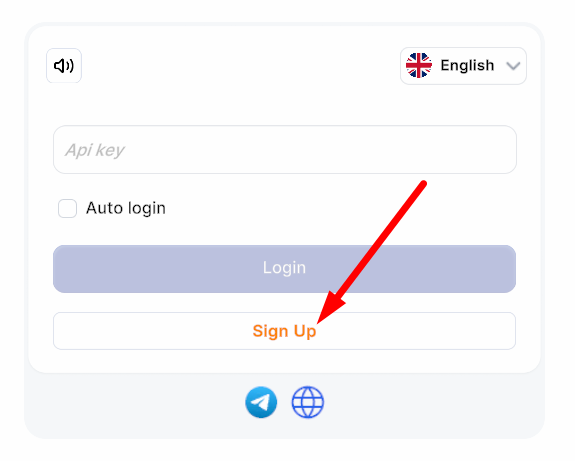
- To log in, you will need an API KEY.
- If you are not registered in the system, click the Sign Up button.
- In the registration window, you will be asked to enter the INVITE CODE (this is optional).
- To create an API KEY, click the Sign Up button.
-
Search, ask in chat rooms or your friends for an INVITE CODE that will give you a bonus on your first deposit. (Optional).
To invite friends and receive a percentage of their deposits, copy your INVITE CODE in your PROFILE.

Check out the main features:
- Welcome bonus for the first deposit
- Purchase for any duration, from 1 hour.
- Purchase one proxy and several to choose from.
- Repeat purchase anytime.
-
Purchasing in PRIVATE/SHARED mode:
PRIVATE - proxies are purchased for one user and are only available to you.
SHARED - proxies are purchased and remain in shared access. - Refund of non-working proxies is available throughout the entire rental period (1 attempt)
- Order history with detailed information on all proxy costs and rental periods.
- Option to set up automatic renewal when purchasing or from proxy history.
- Display proxy list in batches of 20, 50, 100, or 250 per page
- Sort list by Country, Region, City.
- Sort alphabetically by Country, Region, City, IP, ipqualityscore and scamalytics indicators, ISP
- Search by Proxy ID, IP address, ZIP code.
- Free verification of Ipqualityscore and Scamalytics indicators.
- The “Show IP” feature
- Purchase a report before buying a proxy, with data such as: scamalytics, ipqualityscore, DB IP, IP2proxy, IP2proxy Lite, Mmaxmind Geolite 2, Ip Info, Firehol, IP Sum, Spamhaus Drop, x4bnet, Google
- Third-party IP verification (full report).
- History of IP verification for cleanliness with the ability to review the report again.
- Automatic verification of proxy connection availability during purchase.
- Creation of gift cards for transferring balances to other accounts, with gift history and activation status tracking.
- Invitation codes for referrals
- Deposit any cryptocurrency from $5 or with a gift card.
Answers to frequently asked questions:
To make a purchase, you need:
- Select country, region, city
- Select the desired proxy
- Click the left mouse button (the purchase window will open).
- At the top (roughly in the center), you can check the “Auto-renewal” box. If you rent for 1 month, the proxy will automatically renew for 1 month. If you rent for a different period, the proxy will renew for 1 day (each time, until canceled).
- Just below, you will see the “Public-Private” switch. If you select “Private”, only you will be able to use the proxy, and it will disappear from public access. If you select “Public”, the proxy will remain in public access and be available for purchase by all users.
- Next, you need to select the proxy rental period. The cost is calculated based on the selected rental period and the “IPQS” and ‘Scamalitics’ indicators, as well as the “Private/Shared” selection.
- Select country, region, city
- Check the box to the right of each proxy and click the “Buy selected” button at the top.
- At the top (roughly in the center), you can check the “Auto-renewal” box. If you rent for 1 month, the proxy will automatically renew for 1 month. If you rent for a different period, the proxy will renew for 1 day (each time, until canceled).
- Just below, you will see the “Public-Private” switch. If you select “Private”, only you will be able to use the proxy, and it will disappear from public access. If you select “Public”, the proxy will remain in public access and be available for purchase by all users.
- Next, you need to select the proxy rental period. The cost is calculated based on the selected rental period and the “IPQS” and ‘Scamalitics’ indicators, as well as the “Private/Shared” selection.
IMPORTANT!
- Only a non-working proxy can be returned.
- Each proxy has only one return attempt! The button can only be pressed once!
- If you clicked the return button, but the proxy is online, the attempts will end!
- You cannot return a non-working proxy if you have already clicked the button!
To process a refund, please follow these steps:
- Log into your account.
- Go to the “Order History” or “Proxy History” menu.
- Find the proxy you need and click the “Refund” button.
Order History (this is not in Proxy History)
🟢 OrderID
🟢 Order Value (how much was spent or refunded for Refund)
🟢 Total rental time (how long was rented for)
🟢 Full information about the proxy (Host:Port:Login:Pass)
Proxy History (this is not in Order History)
🟢 Purchase Mode (Private/Shared)
🟢 Full information about Country, Region, City, ZIP, Provider (ISP)
🟢 Possibility to turn on/off automatic renewal.
🔠 Separation is made to separate this information, as you can't put so much information in one window.
🔠 For basic work it is enough to use Proxy History
🔠 Order History will need to be checked if necessary:
🟢 How much was rented
🟢 How much was spent
🟢 Whether the Refund has been refunded.
🟢 Take a purchase ID to resolve issues with tech support
When using Web Application, some browsers do not understand that clicking a single mouse button should copy information to the clipboard.
Solution: Change your browser!
That's impossible!
There's no need to write to technical support!
Only non-working proxies can be returned, independently in Proxy History.
If you lose your KEY, you will not be able to access your account.
We do not provide any services to restore access.
Please make sure to keep your KEY in a safe place.
We value your anonymity and privacy.
We value your anonymity and privacy.
Our service does not require you to provide personal information such as your email address, phone number, etc.
We only store the login used for authorization.
We do not provide login recovery services. We recommend that you keep your login details in a safe place.
This could be on paper, in a secure file, or using other methods.
You could even get a tattoo if that suits you.
If you lose your login details, you will not be able to access your account. We do not provide any services to restore access. Please make sure you keep your login details in a safe place.
- Web Application works on the principle of an "Application in a Browser".
- The connection is built through CloudFlare (make sure that your ISP does not block connections to it)
- For comfortable work you will NEED FAST INTERNET (connection speed 1-2 Mbps is NOT suitable)
If you need to extend your rental, for example from 1 hour to 1 month, do the following:
- Go to “Proxy History”
- Find the proxy you need (new purchases are at the top of the list).
- Select the checkbox and click “Buy selected” at the top.
Your INVITE CODE is located in your Profile. Copy it from the “Invite Code” field.
To fulfill the conditions, your friend must make their first deposit.
After fulfilling the conditions:
You receive $5 once + 5% of each deposit made by your friend.
They receive $5 for registering with your invitation code + a $5 WELCOME BONUS.
If the deposit is $10, another $10 will be added to it!
*Bonuses are subject to change, so stay tuned for updates.
To transfer your balance to another account or gift the desired amount to a friend, follow these steps:
- Log in to your account
- Go to the Wallet menu
- Click the “Issue Gift Card” button.
- In the “Enter Gift Amount” field, enter the amount you want to transfer or gift.
- Click the “Issue” button.
- In the field below, copy the gift code you received and use it as intended.
To activate the gift code, you need to do the following:
- Log in to your account
- Go to the Wallet menu
- Enter the code you received in the “Enter gift card” field and click the “Activate Gift” button.
There is a magic button called “Show IP” in the purchase window.